
Your sales team has a productivity crisis hiding in plain sight. According to Salesforce, sales reps spend less than 30% of their time actually selling. The other 70% disappears into administrative tasks. Let's win those back.
Every hour a rep spends on non-selling activities is an hour they're not building relationships, presenting solutions, or closing deals. Sales automation tools flip this equation—by handling administrative work automatically, they free your team to do what humans do best: connect, persuade, and close.
The Sales Productivity Crisis
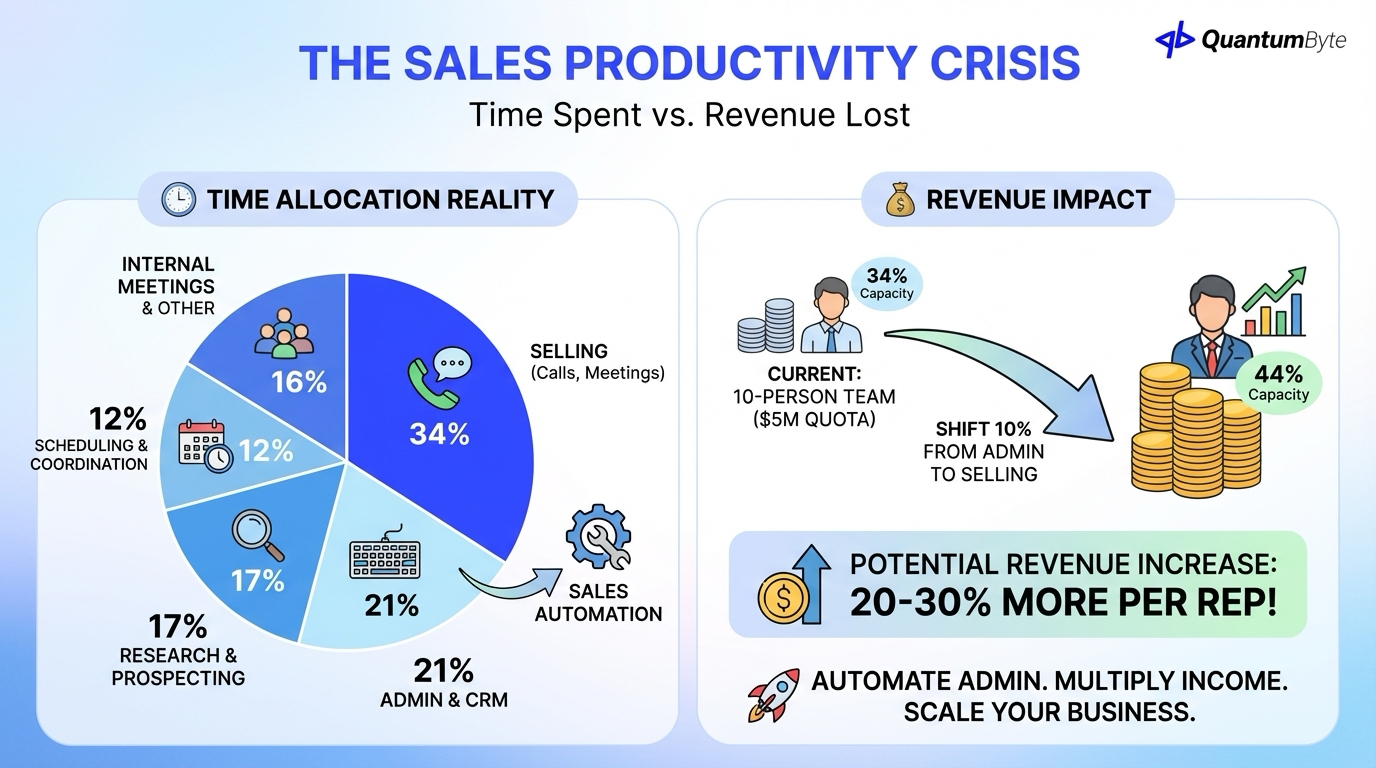
The gap between selling time and non-selling time costs businesses billions:
Time allocation reality:
- 34% of time: Actually selling (calls, meetings, presentations)
- 21% of time: Administrative tasks and CRM data entry
- 17% of time: Research and prospecting
- 12% of time: Scheduling and coordination
- 16% of time: Internal meetings and other
Revenue impact:
For a 10-person sales team with $5M quota:
- If reps sell 34% of the time, they're operating at 34% capacity
- If sales automation could shift just 10% from admin to selling...
- That's 29% more selling time (34% → 44%)
- Potential revenue impact: 20-30% more per rep
15 Sales Automation Processes
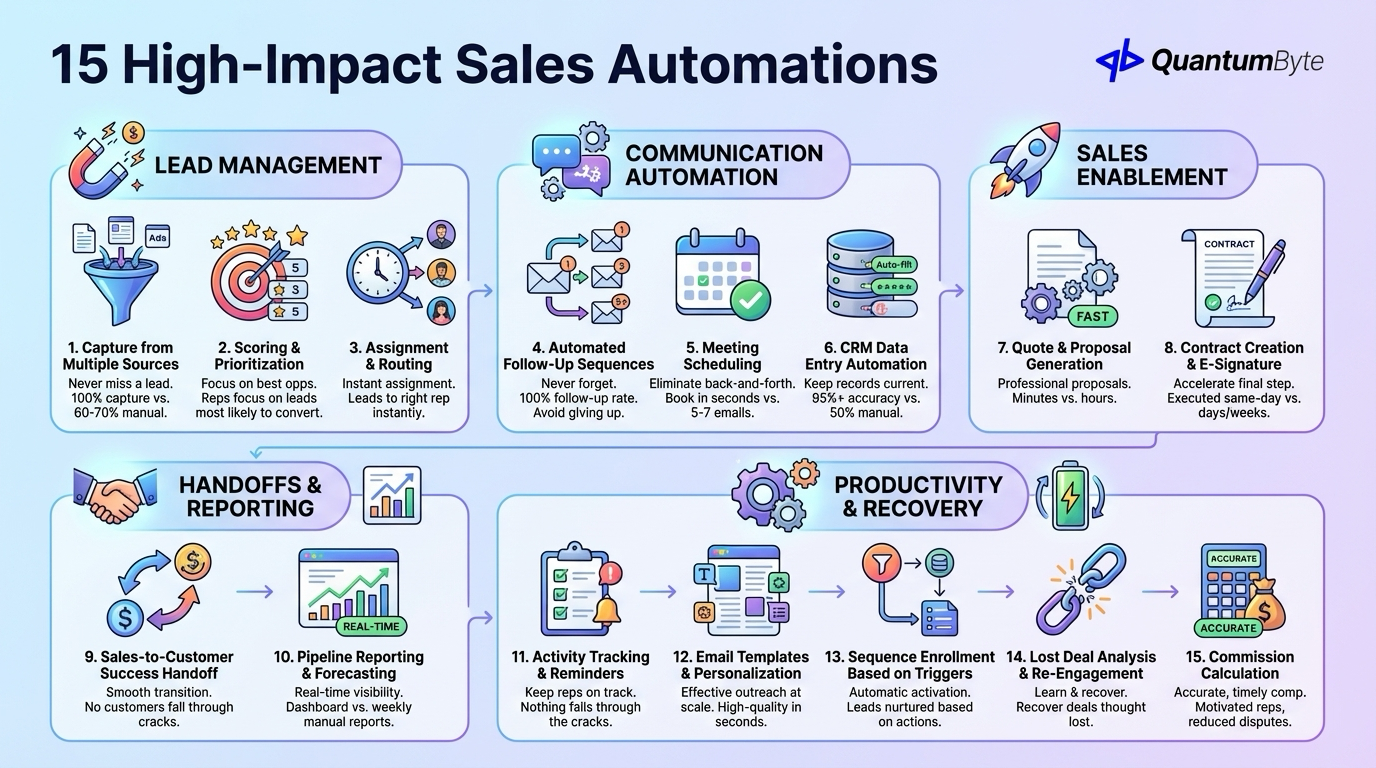
These sales automations deliver the highest revenue impact:
Lead Management
1. Lead Capture from Multiple Sources — Never miss a lead. Automate website form capture, advertising platform integration, and event registration import. Impact: 100% lead capture vs. 60-70% with manual processes.
2. Lead Scoring and Prioritization — Focus on the best opportunities. Automate engagement scoring, demographic scoring, and behavioral scoring with dynamic updates. Impact: Reps focus on leads most likely to convert.
3. Lead Assignment and Routing — Instant assignment to the right rep. Automate round-robin distribution, territory-based assignment, and workload balancing. Impact: Leads assigned instantly vs. hours or days.
Communication Automation
4. Automated Follow-Up Sequences — Never forget to follow up. According to HubSpot, 80% of sales require 5+ follow-ups, yet 44% of salespeople give up after one attempt. Impact: 100% follow-up rate.
5. Meeting Scheduling — Eliminate the back-and-forth. Automate calendar availability sharing and self-scheduling links. Impact: Meetings booked in seconds instead of 5-7 emails.
6. CRM Data Entry Automation — Keep records current without manual entry. Automate email logging, call recording, and contact data enrichment. Impact: 95%+ CRM accuracy vs. 50% with manual entry.
Sales Enablement
7. Quote and Proposal Generation — Professional proposals in minutes. Automate template-based generation, product/pricing configuration, and approval workflows. Impact: Proposals in minutes vs. hours.
8. Contract Creation and E-Signature — Accelerate the final step. Automate contract generation, dynamic field population, and e-signature integration. Impact: Contracts executed same-day vs. days/weeks.
Handoffs and Reporting
9. Sales-to-Customer Success Handoff — Smooth transition to post-sale. Automate handoff notifications and information transfer. Impact: No customers fall through the cracks.
10. Pipeline Reporting and Forecasting — Real-time visibility without manual compilation. Automate pipeline dashboards and forecast generation. Impact: Real-time visibility vs. weekly manual reports.
Productivity Tools
11. Activity Tracking and Reminders — Keep reps on track with automated task generation and reminder notifications. Impact: Nothing falls through the cracks.
12. Email Templates and Personalization — Effective outreach at scale with template library management and A/B testing. Impact: High-quality outreach in seconds.
13. Sequence Enrollment Based on Triggers — Automatic nurture activation based on behavior and stage. Impact: Leads automatically nurtured based on actions.
Recovery and Optimization
14. Lost Deal Analysis and Re-Engagement — Learn and recover with automated loss reason capture and win-back campaigns. Impact: Recover deals thought lost, improve win rates.
15. Commission Calculation — Accurate, timely compensation with automated deal attribution and commission calculation. Impact: Accurate pay, motivated reps, reduced disputes.
Key Sales Automation Features
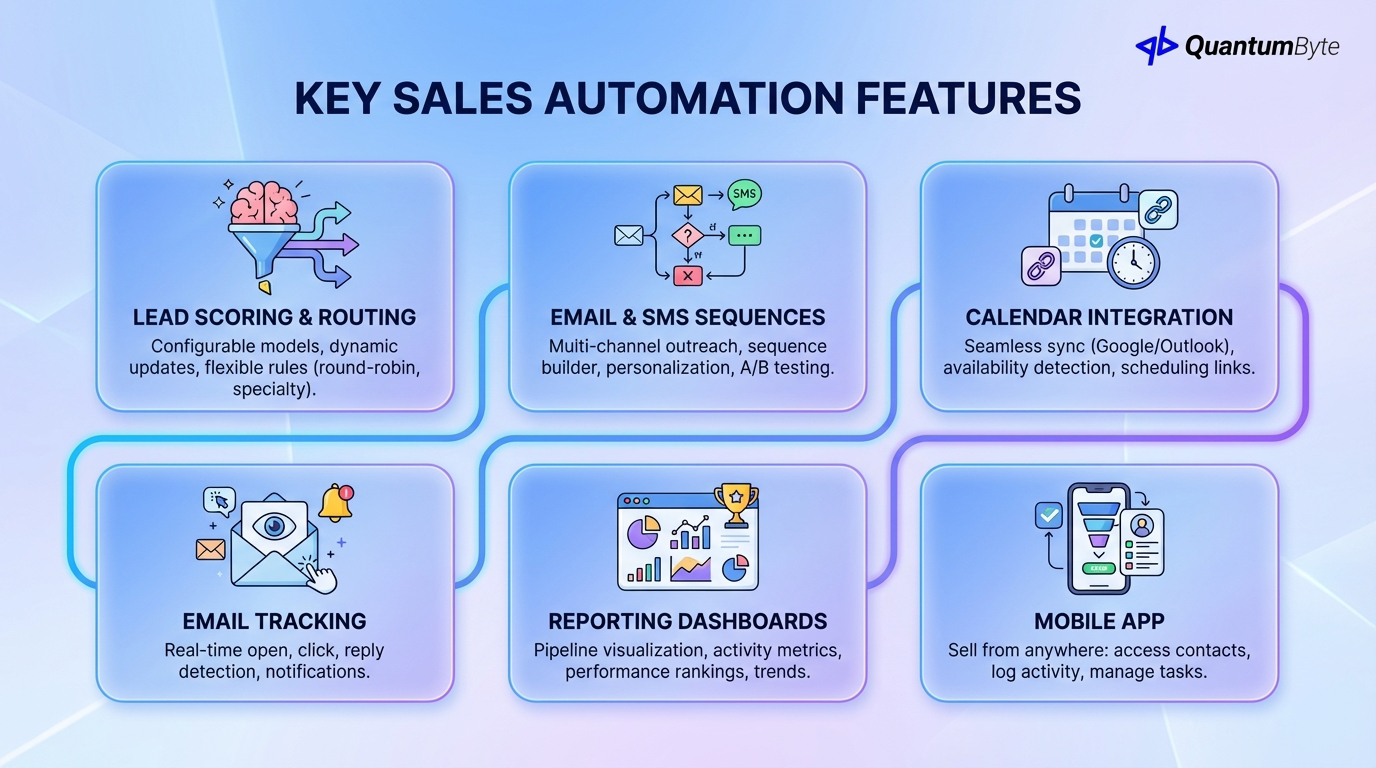
Essential capabilities for effective sales automation tools:
Lead Scoring and Routing
Configurable scoring models with dynamic updates and flexible routing rules including round-robin with weighting and specialty-based routing.
Email and SMS Sequences
Multi-channel outreach with sequence builder, conditional logic, personalization tokens, A/B testing, and performance analytics.
Calendar Integration
Seamless scheduling with Google/Outlook sync, availability detection, scheduling links, and buffer time management.
Email Tracking
Know engagement with open tracking, click tracking, reply detection, and real-time notifications.
Reporting Dashboards
See what matters with pipeline visualization, activity metrics, performance rankings, and trend analysis.
Mobile App
Sell from anywhere with contact access, activity logging, task management, and pipeline updates.
Technology Options
Understanding your sales automation tool choices:
Full-Featured CRM Platforms
Examples: Salesforce, HubSpot, Pipedrive
Cost: $25-150/user/month | Pros: Comprehensive features, established ecosystems | Cons: Monthly costs scale, complexity can overwhelm
Sales Engagement Platforms
Examples: Outreach, SalesLoft, Apollo
Cost: $75-150/user/month | Pros: Purpose-built for outreach, strong sequences | Cons: Additional to CRM, integration complexity
Custom Sales Automation
Cost: $20,000-60,000 (one-time development) | Pros: Built for your process, no per-user fees | Best for: Unique sales processes, high rep counts
| Approach | Cost (10 users, Year 1) | Cost (Year 5) | Flexibility |
|---|---|---|---|
| Full CRM (HubSpot) | $6,000-18,000 | $30,000-90,000 | Medium |
| CRM + Engagement | $12,000-36,000 | $60,000-180,000 | Medium-High |
| Custom Built | $30,000-60,000 | $40,000-80,000 | High |
Implementation Strategy
Path to sales automation success:
Phase 1: Document Current Process (Week 1)
Map current sales process stages, document lead sources, identify pain points, and measure baseline metrics.
Phase 2: Set Up CRM and Automation (Weeks 2-3)
Configure CRM structure, set up automation rules, build email sequences, create templates, and configure integrations.
Phase 3: Import Data and Train (Weeks 3-4)
Clean and import existing data, train sales team, run parallel with old system, and gather feedback.
Phase 4: Go Live and Optimize (Weeks 5-6)
Full production use, monitor adoption, track metrics vs. baseline, optimize sequences, and expand automation.
Unlock Your Team's Revenue Potential
Sales automation isn't about replacing salespeople—it's about unleashing them:
What you gain:
- 20-30% more revenue per rep
- 15-25% shorter sales cycles
- 100% follow-up rates
- Real-time visibility
What you eliminate:
- Administrative time drain
- Missed follow-ups
- Proposal delays
- Forecast guesswork
The technology is proven. The ROI is clear. The question is how long you'll continue accepting the productivity loss of manual sales processes.
Ready to transform your sales team? Schedule a consultation to explore your sales automation opportunities.
Other Guides to Explore
- Lead Management Software: Capture More Leads and Convert at Higher Rates
- CRM for Small Business: Choose the Right System to Drive Revenue Growth
- How to Automate Business Processes to Increase Revenue in 2025
- Workflow Automation Software: How to Reduce Costs and Boost Revenue
Frequently Asked Questions (FAQ)
How much can sales automation increase revenue?
Most implementations see 20-30% revenue increase per rep within the first year. The primary drivers: more selling time (reclaimed from admin), faster response (winning competitive deals), consistent follow-up (capturing previously lost opportunities), and shorter cycles (more deals per period).
How long does sales automation implementation take?
Basic CRM setup: 2-4 weeks. Comprehensive sales automation with sequences, integrations, and custom workflows: 4-8 weeks. Start with quick wins and expand systematically.
What's more important: CRM or sales engagement tools?
CRM is foundational—you need a system of record for contacts, deals, and activities. Sales engagement tools (sequences, tracking) add productivity on top. Many modern CRMs include engagement features. Evaluate whether your CRM's built-in capabilities are sufficient before adding separate engagement tools.
Can sales automation work for relationship-based sales?
Absolutely—that's often where it helps most. Sales automation handles the administrative burden so reps can spend more time on relationship building. It ensures consistent touchpoints while freeing reps for genuine conversations.

