There's a myth that CRM is only for big companies with dedicated sales teams and IT departments.
The reality? SMBs with CRM grow 41% faster than those without.
That growth advantage comes from a simple principle: organized customer data enables better relationships, which drive more revenue. Whether you have 5 customers or 5,000, knowing their history, tracking your interactions, and following up consistently beats memory and spreadsheets.
This guide helps you cut through CRM for small business confusion to find the right approach—whether that's a simple tool, a comprehensive platform, or a custom system built exactly for your needs.
Why Small Businesses Need CRM
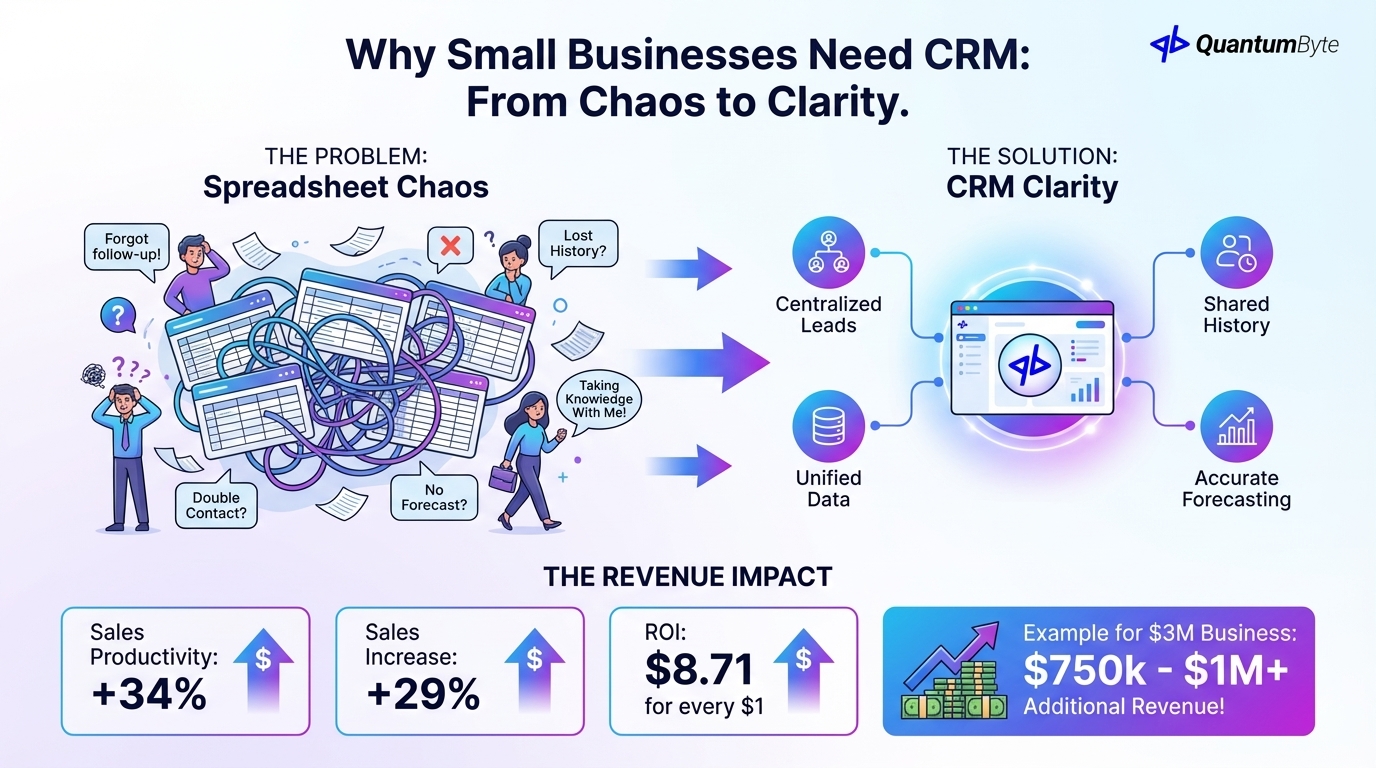
The spreadsheet approach works until it doesn't. Eventually:
- You forget to follow up on a promising lead
- Two salespeople contact the same prospect
- A customer mentions a previous conversation you don't remember
- You can't forecast revenue because data lives in multiple places
- A team member leaves and takes institutional knowledge with them
CRM solves these problems by creating a single source of truth for customer relationships.
The Revenue Impact of CRM for Small Business
The numbers make the case:
- 34% sales productivity improvement
- 29% increase in sales
- $8.71 return for every $1 spent on CRM
For a $3M business with 5 sales reps:
Conservative estimate of 25% revenue improvement per rep = $750,000-1M additional revenue total
What CRM Should Do for Your Business
CRM is more than a contact database. Here's what it enables:
| Capability | Impact |
|---|---|
| Never Miss a Follow-Up | 80% of sales require 5+ follow-ups. CRM ensures they happen. |
| Personalized Outreach | Know every customer's history before every interaction. |
| Faster Response Times | Instant access to customer info builds trust. |
| Better Qualification | Lead scoring identifies best opportunities. |
| Shorter Sales Cycles | Streamlined processes accelerate deals. |
| Higher Win Rates | Data-driven insights reveal what works. |
| Systematic Upsell | Visibility into buying patterns reveals growth opportunities. |
| Proactive Retention | Identify at-risk customers before they leave. |
| Accurate Forecasting | Pipeline data enables capacity planning. |
Essential CRM Features for Small Business
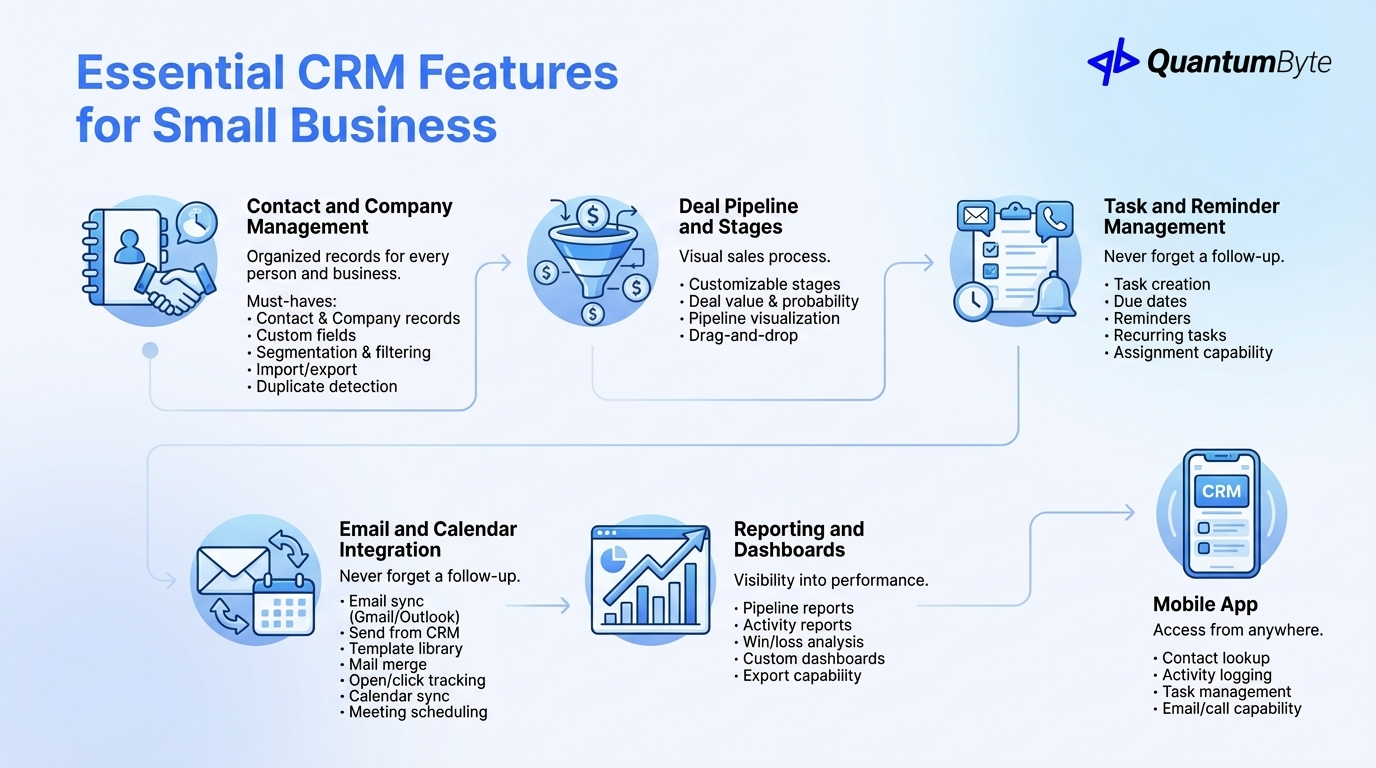
Focus on what matters:
Contact and Company Management
The foundation—organized records for every person and business you interact with.
Must-haves: Contact and company records, custom fields, segmentation and filtering, import/export capability, duplicate detection.
Deal Pipeline and Stages
Visual sales process management with customizable stages, deal value and probability, pipeline visualization, and drag-and-drop movement.
Activity Tracking
Complete interaction history including email logging, call logging, meeting tracking, notes, and timeline view.
Task and Reminder Management
Never forget a follow-up with task creation, due dates, reminder notifications, recurring tasks, and assignment capability.
Email and Calendar Integration
Must-haves: Email sync (Gmail/Outlook), send from CRM, template library, mail merge, open/click tracking, calendar sync, and meeting scheduling.
Reporting and Dashboards
Visibility into performance with pipeline reports, activity reports, win/loss analysis, custom dashboards, and export capability.
Mobile App
Access from anywhere with contact lookup, activity logging, task management, and email/call capability.
Popular CRM Options Compared
| CRM | Starting Price | Price Range | Ease of Use | Customization | Best For | Pros | Cons |
|---|---|---|---|---|---|---|---|
| HubSpot | Free | Free tier; paid starts at $50/user/month | Easy | Medium | Small teams wanting integrated marketing | Free tier is genuinely usable, marketing tools integration, easy to get started, good mobile app | Gets expensive as you scale, limited customization on lower tiers |
| Salesforce | $25/user/mo | $25-300/user/month depending on edition | Complex | Very High | Companies needing maximum customization and scale | Most powerful and customizable, largest ecosystem of add-ons, enterprise-proven | Complex—often overkill for SMBs, expensive with add-ons, requires admin expertise |
| Pipedrive | $14/user/mo | $14-99/user/month | Very Easy | Low-Medium | Sales-focused teams wanting simplicity | Pipeline-focused intuitive interface, reasonable pricing, good mobile experience | Limited marketing features, less customization than Salesforce |
| Zoho CRM | $14/user/mo | $14-52/user/month | Moderate | Medium-High | Budget-conscious teams wanting features | Affordable with lots of features, part of Zoho ecosystem, good automation capabilities | Interface less polished, learning curve for advanced features |
| Monday Sales CRM | $10/user/mo | $10-24/user/month | Easy | Medium | Teams already using Monday, wanting visual approach | Visual flexible interface, part of Monday ecosystem, easy customization | Newer, less proven, CRM features still developing |
When to Build Custom CRM vs. Buy Off-the-Shelf
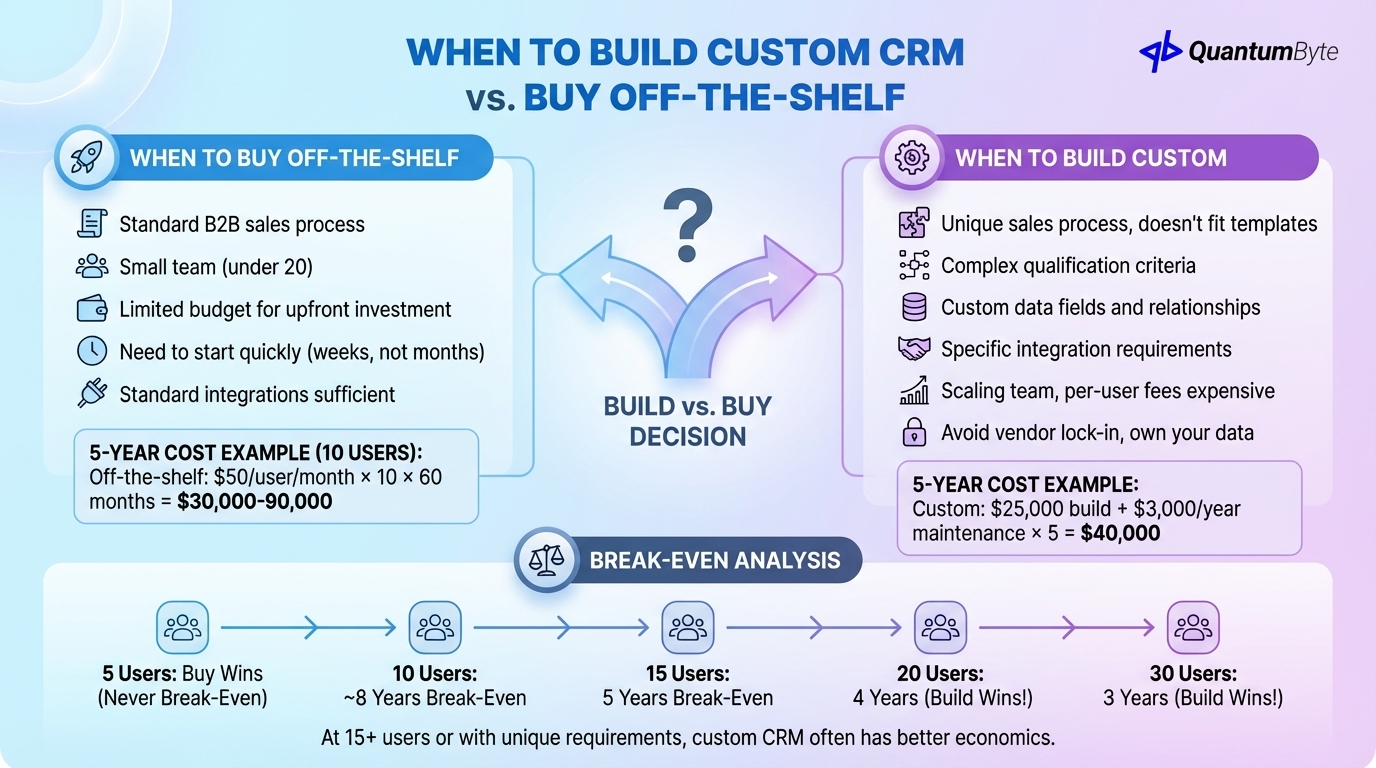
The build vs. buy decision:
When to Buy Off-the-Shelf
Buy when:
- Standard B2B sales process
- Small team (under 20)
- Limited budget for upfront investment
- Need to start quickly (weeks, not months)
- Standard integrations sufficient
5-year cost example (10 users):
Off-the-shelf: $50/user/month × 10 × 60 months = $30,000-90,000
When to Build Custom
Build when:
- Unique sales process that doesn't fit templates
- Complex qualification criteria
- Custom data fields and relationships
- Specific integration requirements
- Scaling team where per-user fees become expensive
- Want to avoid vendor lock-in and own your data
5-year cost example:
Custom: $25,000 build + $3,000/year maintenance × 5 = $40,000
Break-Even Analysis
| Users | Off-Shelf (5-yr @ $50/user/mo) | Custom (Build + Maintenance) | Break-Even |
|---|---|---|---|
| 5 | $15,000 | $35,000 | Never (buy) |
| 10 | $30,000 | $40,000 | ~8 years |
| 15 | $45,000 | $45,000 | 5 years |
| 20 | $60,000 | $50,000 | 4 years (build wins) |
| 30 | $90,000 | $55,000 | 3 years (build wins) |
At 15+ users or with unique requirements, custom CRM often has better economics.
CRM Implementation Best Practices
Success factors for any CRM for small business:
Get Sales Team Buy-In: Involve salespeople in selection. CRM only works if people use it.
Clean Data Before Migration: Deduplicate contacts, standardize formats, remove outdated records. Dirty data costs businesses 15-25% of revenue.
Start Simple, Add Complexity: Don't over-engineer initially. Launch with essential features only and add based on actual needs.
Train Thoroughly: Even simple tools need training for consistent use. Plan for initial training, role-specific guidance, and new hire onboarding.
Measure Adoption: Track login frequency, monitor data entry completeness, and address barriers early. The lack of strategy, poor process, and focusing on tech over people are the primary reason implementations fail according to a SalesForce article.
Connect to Other Systems: Email/calendar integration is essential. Marketing automation and accounting connections multiply value.
Building Your Custom CRM App with QuantumByte
When off-the-shelf doesn't fit, QuantumByte develops custom CRM apps tailored to your sales process:
- Designed for Your Process: Your terminology, your stages, your qualification criteria
- All Essential Features: Contact management, pipeline visualization, reporting, mobile access
- Integration Ready: Email, calendar, marketing automation, accounting, custom APIs
- Mobile App for Field Sales: Native experience with offline capability
- No Per-User Monthly Fees: One-time development, modest annual maintenance
- You Own the Code and Data: No vendor lock-in, host anywhere, modify as needed
Conclusion: CRM is a Growth Multiplier for Small Business
CRM isn't overhead—it's infrastructure for growth. The 41% growth advantage for CRM users isn't magic—it's the compound effect of better relationships, consistent execution, and data-driven improvement.
Next steps:
- Assess your current customer data management
- Define your must-have requirements
- Evaluate options against your needs
- Plan implementation with adoption in mind
- Launch, measure, and iterate
Ready to accelerate your growth with the right CRM for small business? Schedule a consultation to explore your options.
Other Guides to Explore
- Sales Automation Tools: Increase Revenue and Close Deals Faster
- Lead Management Software: Capture More Leads and Convert at Higher Rates
- How to Automate Business Processes to Increase Revenue in 2025
- Workflow Automation Software: How to Reduce Costs and Boost Revenue
Frequently Asked Questions (FAQ)
Does my small business really need CRM?
If you have customers or prospects to track, probably yes. The cost of lost opportunities and poor follow-up typically exceeds CRM investment. A 5-person company might thrive with a simple tool while a 20-person sales team needs more structure.
Which CRM is best for small business?
It depends on your needs. HubSpot's free tier is great for getting started. Pipedrive offers simplicity for straightforward sales. Custom CRM makes sense for unique requirements or larger teams where per-user fees add up.
How much does CRM cost?
Cloud CRMs: $0-150/user/month depending on features. Custom CRM: $20,000-60,000 development plus maintenance. Calculate 5-year total cost of ownership and compare against the revenue impact.
How long does CRM implementation take?
Simple cloud CRM: 2-4 weeks. Complex cloud CRM with customization: 4-8 weeks. Custom CRM: 6-12 weeks. Start simple and expand rather than trying to implement everything at once.
Should I customize off-the-shelf CRM or build custom?
If off-the-shelf fits 80%+ of your needs with reasonable customization, start there. Build custom when your process is truly unique, when integrations don't exist, or when per-user fees become prohibitive at your team size.

