Your sales team is drowning in admin work. According to Salesforce research, sales reps spend less than 30% of their time actually selling. The rest? Data entry, email follow-ups, scheduling, updating records, and generating reports.
That's expensive. Every hour spent on manual tasks is an hour not spent closing deals. For a team of five sales reps earning $80,000 each, you're effectively paying $288,000 annually for administrative work.
CRM sales automation changes this equation. By automating repetitive tasks, your team can focus on what they do best: building relationships and closing deals.
The Sales Productivity Crisis
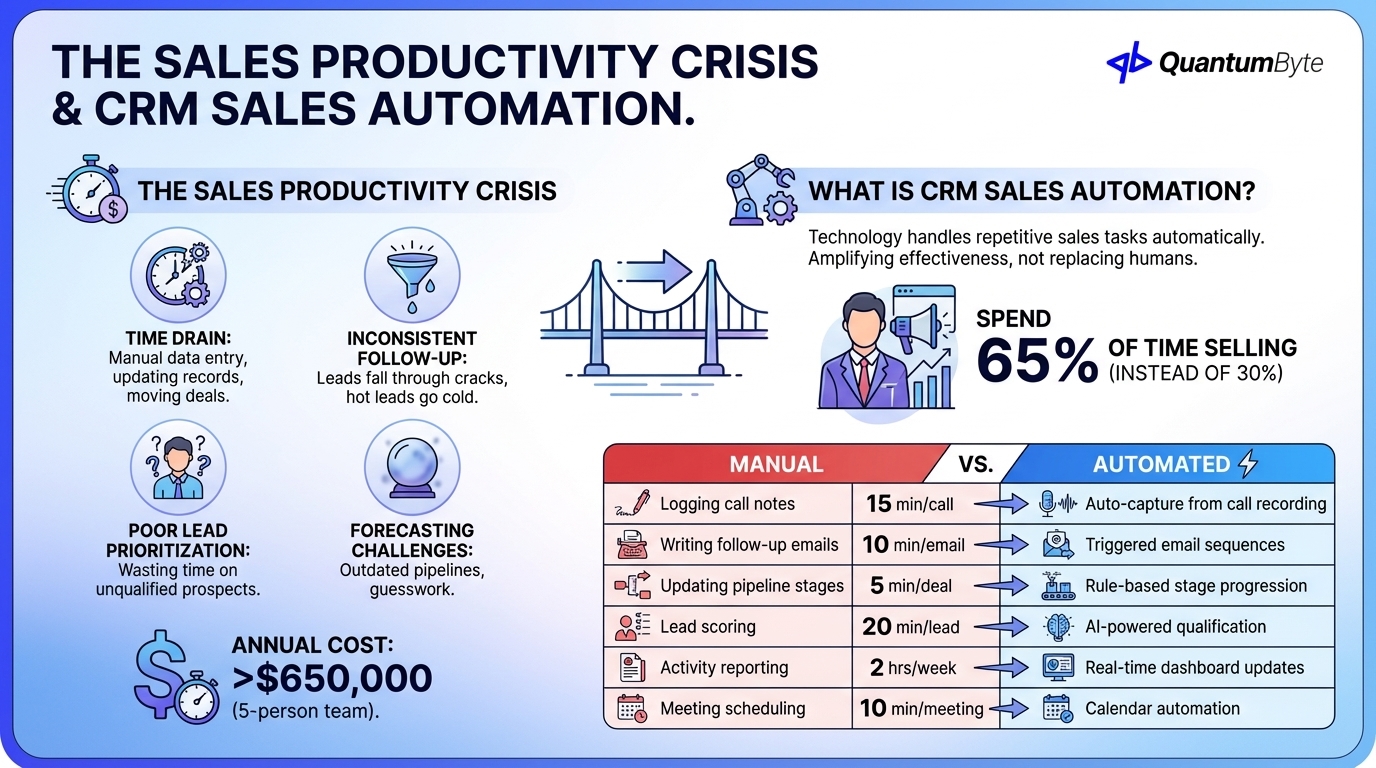
The modern sales process is paradoxically inefficient. Despite having more tools than ever, sales teams struggle with:
Time drain: Manual data entry after every call, meeting, or email. Updating contact records, logging activities, moving deals through pipeline stages.
Inconsistent follow-up: Leads fall through cracks when reps juggle dozens of prospects. Hot leads go cold because follow-up sequences depend on memory.
Poor lead prioritization: Without automated scoring, reps waste time on unqualified prospects while high-value leads wait.
Forecasting challenges: Manual pipeline updates mean forecasts are always outdated, making resource planning guesswork.
For a five-person sales team, manual processes cost over $650,000 annually in direct and indirect costs. The opportunity cost is even higher. This is revenue your team should be generating but isn't.
What is CRM Sales Automation?
CRM sales automation uses technology to handle repetitive sales tasks automatically. Instead of manually logging calls, sending follow-up emails, or updating deal stages, the CRM does it for you based on predefined rules and triggers.
This isn't about replacing salespeople, it's about amplifying their effectiveness. The best sales reps become even better when they can spend 65% of their time selling instead of 30%.
| Manual Process | Automated Equivalent | Time Saved |
|---|---|---|
| Logging call notes | Auto-capture from call recording | 15 min/call |
| Writing follow-up emails | Triggered email sequences | 10 min/email |
| Updating pipeline stages | Rule-based stage progression | 5 min/deal |
| Lead scoring | AI-powered qualification | 20 min/lead |
| Activity reporting | Real-time dashboard updates | 2 hrs/week |
| Meeting scheduling | Calendar automation | 10 min/meeting |
12 CRM Sales Automation Opportunities
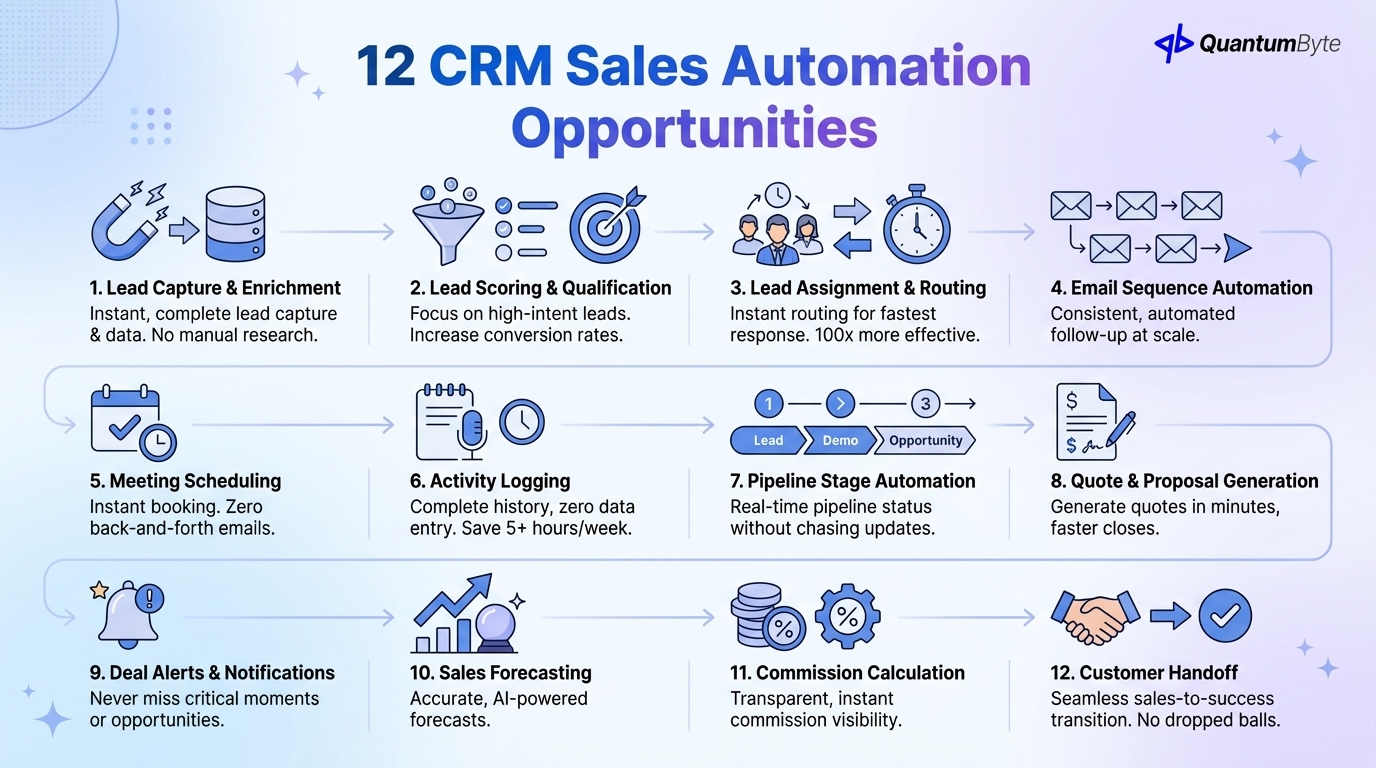
These automations deliver the highest impact for sales teams:
1. Lead Capture and Enrichment
What to automate: Form submissions to CRM, website visitor tracking, email signature capture, LinkedIn Sales Navigator integration, automatic company data enrichment via Clearbit or ZoomInfo.
Impact: Every lead captured instantly with complete contact and company data. No manual research required.
2. Lead Scoring and Qualification
What to automate: Behavior-based scoring (email opens, website visits, content downloads), demographic scoring (company size, industry, title), engagement scoring, qualification threshold alerts.
Impact: Sales reps focus only on leads most likely to convert. Conversion rates increase 20-30%.
3. Lead Assignment and Routing
What to automate: Round-robin distribution, territory-based assignment, skill-based routing, load balancing across team members, escalation rules for VIP leads.
Impact: Instant lead assignment ensures fastest possible response time. Harvard Business Review found responding within 5 minutes is 100x more effective than waiting 30 minutes.
4. Email Sequence Automation
What to automate: Welcome sequences for new leads, nurture campaigns by stage, re-engagement sequences for cold leads, follow-up triggers based on behavior, personalization tokens for scale.
Impact: Consistent follow-up without manual effort. 80% of sales require 5+ follow-ups, but most reps stop at 2.
5. Meeting Scheduling
What to automate: Calendar link generation via Calendly or HubSpot Meetings, availability sync, automatic reminders, no-show follow-up, timezone handling.
Impact: Zero back-and-forth emails to book meetings. Scheduling time drops from 10 minutes to instant.
6. Activity Logging
What to automate: Email tracking and logging, call recording and transcription, meeting notes via AI summarization, task completion logging, interaction history consolidation.
Impact: Complete activity history without manual data entry. Reps save 5+ hours per week.
7. Pipeline Stage Automation
What to automate: Stage progression based on activities (demo completed = opportunity), automatic task creation per stage, probability updates, stuck deal alerts, win/loss reason capture.
Impact: Pipeline always current. Managers see real-time status without chasing reps for updates.
8. Quote and Proposal Generation
What to automate: Product/pricing database integration, proposal template population, approval workflow routing, e-signature via DocuSign or PandaDoc, version tracking.
Impact: Proposals generated in minutes instead of hours. Faster quotes mean faster closes.
9. Deal Alerts and Notifications
What to automate: High-value deal alerts, competitor mention detection, decision-maker engagement notifications, contract expiration warnings, upsell opportunity flags.
Impact: Never miss a critical moment. Reps act on opportunities when they matter most.
10. Sales Forecasting
What to automate: Weighted pipeline calculations, historical win-rate analysis, AI-powered deal predictions, commit vs. upside categorization, quota attainment tracking.
Impact: Accurate forecasts without manual spreadsheet work. Leadership makes better resource decisions.
11. Commission Calculation
What to automate: Deal attribution, split calculations for team deals, accelerator tracking, quota attainment updates, payout report generation.
Impact: Transparent, instant commission visibility motivates reps and eliminates disputes.
12. Customer Handoff
What to automate: Won deal notification to customer success, account data transfer, onboarding task creation, implementation timeline triggers, renewal date scheduling.
Impact: Seamless transition from sales to success. No dropped balls during handoff.
Benefits of CRM Sales Automation
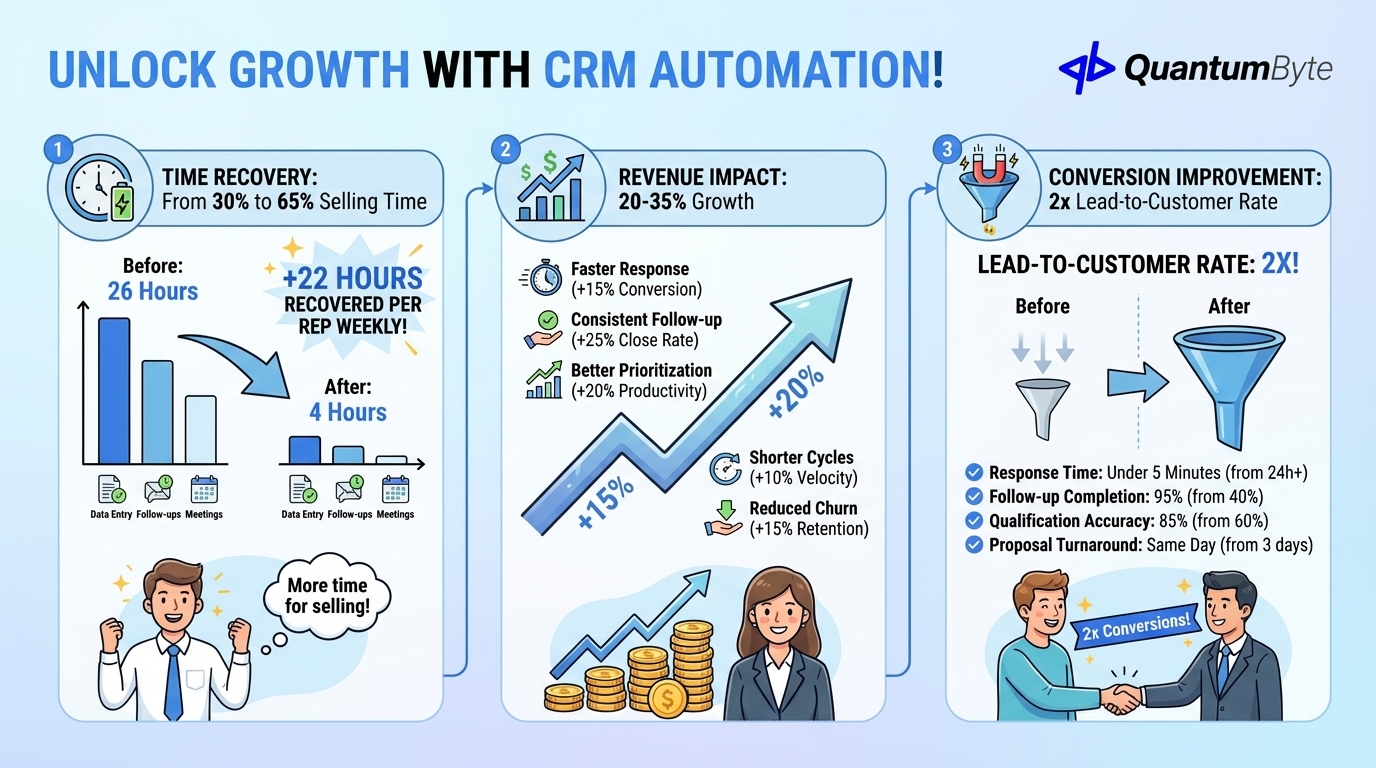
Time Recovery: From 30% to 65% Selling Time
| Activity | Manual Time/Week | Automated Time/Week | Recovered |
|---|---|---|---|
| Data entry | 8 hours | 1 hour | 7 hours |
| Follow-up emails | 6 hours | 1 hour | 5 hours |
| Meeting scheduling | 3 hours | 0.5 hours | 2.5 hours |
| Report generation | 4 hours | 0.5 hours | 3.5 hours |
| Lead research | 5 hours | 1 hour | 4 hours |
| Total | 26 hours | 4 hours | 22 hours |
That's 22 hours per week per rep returned to actual selling. For a five-person team, that's 110 additional selling hours weekly.
Revenue Impact: 20-35% Growth
CRM sales automation drives revenue through multiple channels:
| Revenue Driver | Impact |
|---|---|
| Faster lead response | +15% conversion |
| Consistent follow-up | +25% close rate |
| Better lead prioritization | +20% rep productivity |
| Shorter sales cycles | +10% deal velocity |
| Reduced churn from better handoffs | +15% retention |
Conversion Improvement: 2x Lead-to-Customer Rate
| Metric | Before Automation | After Automation | Improvement |
|---|---|---|---|
| Lead response time | 24+ hours | Under 5 minutes | 288x faster |
| Follow-up completion | 40% | 95% | 138% increase |
| Lead qualification accuracy | 60% | 85% | 42% improvement |
| Proposal turnaround | 3 days | Same day | 3x faster |
| Lead-to-customer rate | 3% | 6% | 2x |
Technology Options for CRM Sales Automation
Understanding your choices:
Enterprise CRM Platforms
Examples: Salesforce, Microsoft Dynamics 365, Oracle Sales Cloud
Cost: $150-300/user/month
Pros: Comprehensive features, extensive integrations, enterprise security.
Cons: Complex implementation, expensive, over-featured for many businesses.
Mid-Market CRM Solutions
Examples: HubSpot Sales Hub, Pipedrive, Zoho CRM
Cost: $50-150/user/month
Pros: Balance of features and usability, good automation capabilities, reasonable pricing.
Cons: May require add-ons for advanced features, some customization limits.
Custom CRM Sales Automation Solution
Cost: $5,000-10,000 (one-time development)
Pros: Your exact sales process automated, no per-user fees at scale, complete customization, competitive advantage from unique workflows.
Best for: Unique sales processes, high rep counts, specific integration needs, companies wanting to own their sales tech stack.
| Approach | Year 1 Cost (10 users) | Year 5 Cost | Customization |
|---|---|---|---|
| Enterprise Platform | $18,000-36,000 | $90,000-180,000 | High (complex) |
| Mid-Market CRM | $6,000-18,000 | $30,000-90,000 | Medium |
| Custom Built | $10,000 + $5,000 maintenance | $35,000 | Medium |
Implementation Best Practices
Start with High-Impact Automations
Don't try to automate everything at once. Begin with:
- Lead capture and assignment — Immediate impact on response time
- Email sequences — Consistent follow-up without effort
- Activity logging — Biggest time saver for reps
- Pipeline stage automation — Real-time visibility for managers
Map Your Sales Process First
Before automating, document your current process:
| Stage | Entry Criteria | Exit Criteria | Required Actions | Automation Opportunity |
|---|---|---|---|---|
| Lead | Form fill / inbound | Qualified by SDR | Research, initial outreach | Lead enrichment, scoring |
| Qualified | BANT criteria met | Demo scheduled | Discovery call | Sequence triggers, calendar |
| Demo | Meeting held | Proposal requested | Present solution | Auto-logging, follow-up |
| Proposal | Quote sent | Verbal yes/no | Negotiate terms | Document generation |
| Closed | Contract signed | Handoff complete | Onboarding initiation | Success notification |
Train for Adoption
CRM sales automation only works if reps use it. Focus training on:
- The "what's in it for me" — Show time savings and easier quota attainment
- Hands-on practice — Let reps experience the automation in action
- Quick wins — Start with automations that make their day easier
- Ongoing support — Dedicated champion for questions and optimization
Measure and Iterate
Track these metrics to ensure automation delivers value:
| Metric | Target | Measurement Frequency |
|---|---|---|
| Lead response time | Under 5 minutes | Daily |
| Follow-up completion rate | 95%+ | Weekly |
| Data quality score | 90%+ completeness | Weekly |
| Pipeline accuracy | Within 10% of actual | Monthly |
| Rep selling time | 60%+ | Monthly |
| Win rate improvement | +20% baseline | Quarterly |
Advanced CRM Sales Automation Features
Beyond basic automation:
AI-Powered Deal Insights
Machine learning analyzes patterns across won and lost deals to predict outcomes, recommend next best actions, and identify deals at risk. Gong and Clari lead this space, but custom AI models can be built into your CRM.
Conversation Intelligence
Automatic call recording, transcription, and analysis. AI identifies competitor mentions, objections, pricing discussions, and next steps without manual note-taking.
Predictive Lead Scoring
Move beyond rule-based scoring to AI models that learn from your conversion history. These models identify patterns humans miss, continuously improving accuracy.
Revenue Intelligence
Unified view across all revenue operations—marketing attribution, sales pipeline, customer success health scores—providing complete visibility into the revenue engine.
Workflow Automation Across Systems
Connect your CRM to the entire tech stack—Slack notifications, Asana task creation, QuickBooks invoice generation, Intercom handoff—for end-to-end process automation.
Building Your CRM Sales Automation with QuantumByte
QuantumByte develops custom CRM sales automation solutions designed for your specific sales process:
- Lead management: Capture, enrichment, scoring, and routing tailored to your qualification criteria
- Sales sequence engine: Multi-channel sequences (email, SMS, LinkedIn, calls) with behavior-based branching
- Pipeline automation: Custom stages, probability models, and progression rules matching your sales methodology
- Integration hub: Connect to your email, calendar, phone system, proposal tools, and accounting software
- Real-time dashboards: Rep performance, pipeline health, forecast accuracy, and activity metrics
- AI assistance: Deal recommendations, next-best-action suggestions, and risk alerts
Conclusion: Make Every Rep Your Best Rep
CRM sales automation doesn't replace great salespeople—it multiplies their effectiveness. When your team spends 65% of their time selling instead of 30%, everything changes:
For sales reps: More time with prospects, consistent follow-up without effort, clear priorities every day.
For sales managers: Real-time pipeline visibility, accurate forecasts, coaching based on data not guesswork.
For business leaders: Predictable revenue growth, scalable sales operations, competitive advantage.
The ROI is immediate—typically 500%+ in the first year. The technology is proven. The only question is how much longer you'll let manual processes hold your team back.
Ready to transform your sales operations? Schedule a consultation to explore your automation opportunities.
Other Guides to Explore
- Lead Management Software: Capture More Leads and Convert at Higher Rates
- Sales Automation Tools: Increase Revenue and Close Deals Faster
- CRM for Small Business: Choose the Right System to Drive Revenue Growth
- How to Automate Business Processes to Increase Revenue in 2025
Frequently Asked Questions (FAQ)
How long does CRM sales automation implementation take?
For existing CRM platforms: 4-8 weeks for full automation setup including integrations. Custom solutions: 6-10 weeks from requirements to production. Start with quick wins (email sequences, lead assignment) in week one while building more complex automations.
Will my sales reps actually use the automation?
Adoption succeeds when automation makes reps' lives easier. Focus on removing pain points (data entry, follow-up management) before adding manager-focused features. Reps who see time savings embrace the system quickly.
Can CRM sales automation work with my existing tools?
Yes. Modern automation connects to email platforms (Gmail, Outlook), calendar systems, phone systems (RingCentral, Aircall), proposal tools (PandaDoc, DocuSign), and more. Custom integrations can connect virtually any system.
What's the minimum team size for CRM sales automation to make sense?
Even solo founders benefit from lead capture and email sequence automation. Full CRM sales automation typically shows strong ROI at 3+ salespeople, where time savings and consistency benefits multiply.
How do I measure CRM sales automation ROI?
Track before/after metrics: lead response time, follow-up completion rate, rep selling time percentage, win rate, and average deal cycle length. Most implementations see measurable improvement within 30 days.
Will automation make my sales process feel impersonal?
Done right, automation enhances personalization. Reps have more time for meaningful conversations because admin work is handled. Personalization tokens, behavior-based triggers, and timely follow-ups actually make interactions feel more attentive, not less.

