Your HR team has a time problem. According to Deloitte, HR managers spend 40% of their time on administrative tasks. This includes, data entry, paperwork, routine inquiries, and process coordination. Only 60% goes to strategic work that actually moves the business.
This ratio is backwards. Administrative work doesn't differentiate your company or drive business results. HR automation flips this equation, handling routine tasks automatically so your HR team can focus on what matters: talent development, culture building, and employee engagement.
The Business Case for HR Automation
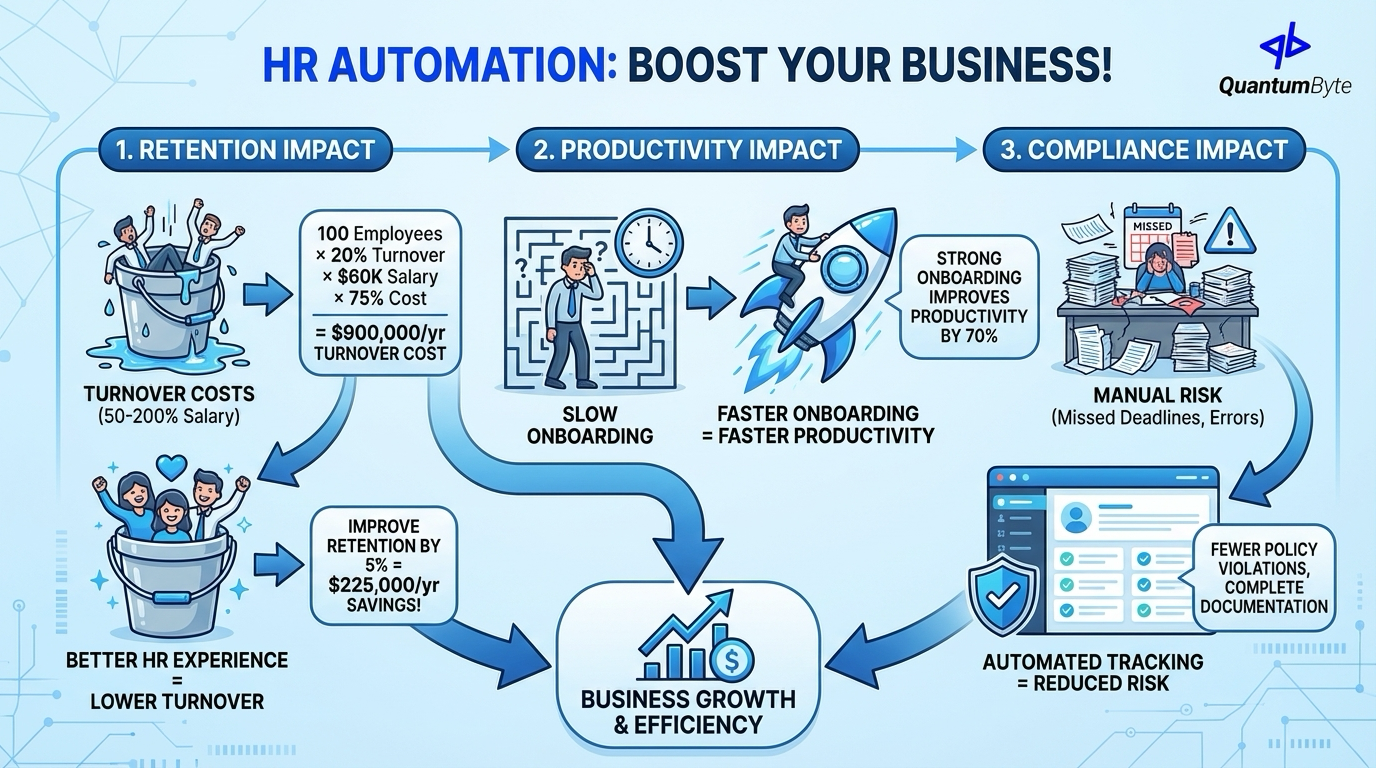
Beyond efficiency, HR automation directly impacts business outcomes:
Retention impact:
Employee turnover costs 50-200% of annual salary to replace. Better HR systems leads to better employee experience which in turns leads to lower turnover.
Calculation:
100 employees × 20% turnover × $60K avg salary × 75% replacement cost = $900,000 annual turnover cost
Improving retention by just 5% through better HR experience: $225,000 annual savings
Productivity impact:
Faster onboarding = faster productivity. Strong onboarding improves new hire productivity by 70%.
Compliance impact:
Automated tracking reduces compliance risk, missed deadlines, incomplete documentation, policy violations.
15 HR Automation Processes with the Highest ROI
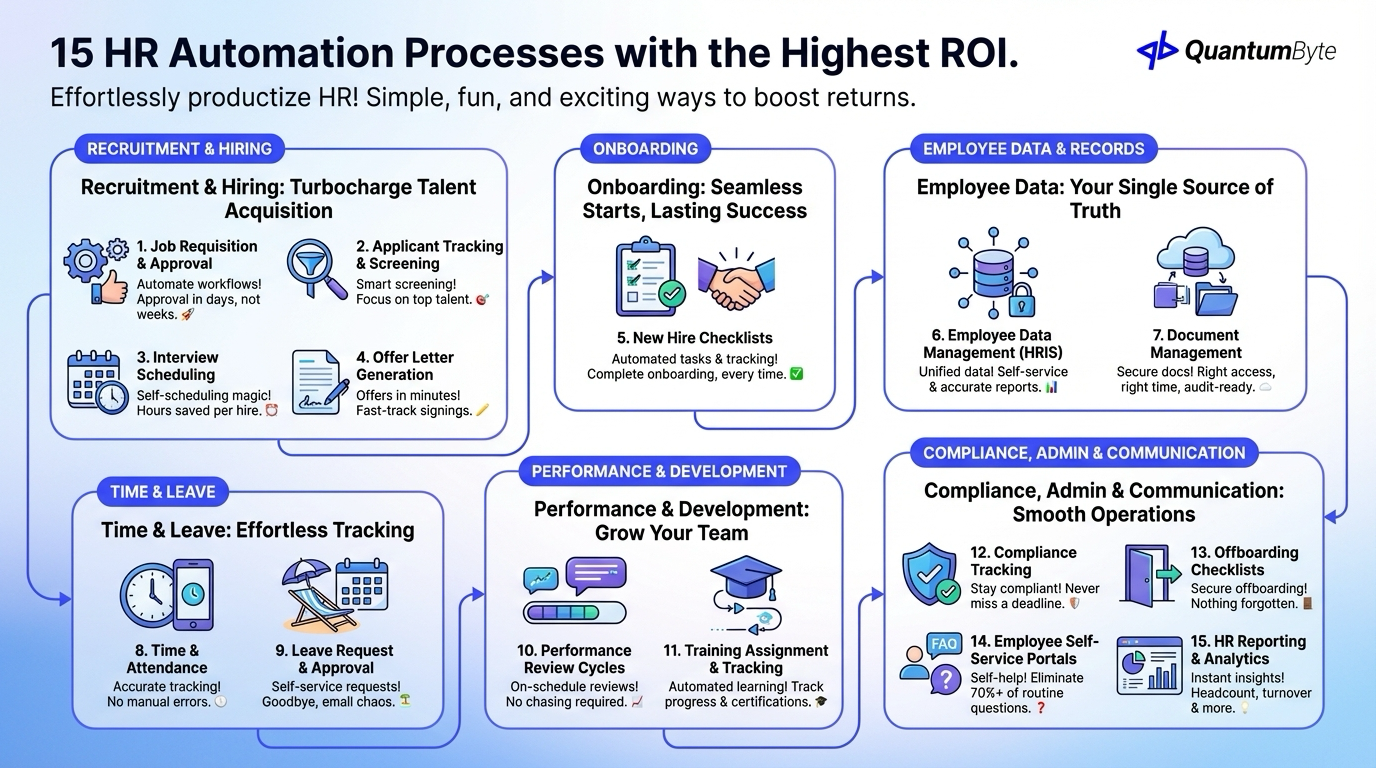
These processes deliver the highest returns when automated:
Recruitment & Hiring
1. Job Requisition and Approval Workflows
Automate request submission, budget verification, approval routing, position creation, and job posting. Impact: Days to approval instead of weeks.
2. Applicant Tracking and Screening
Handle application intake, resume parsing, initial screening criteria, candidate scoring, and status tracking. Impact: Focus human attention on top candidates.
3. Interview Scheduling
Automate calendar availability checking, candidate self-scheduling via tools like Calendly, interviewer coordination, and reminder notifications. Impact: Hours saved per hire.
4. Offer Letter Generation and E-Signature
Automate letter generation from templates, compensation data population, approval workflow, and e-signature integration. Impact: Offers out in minutes, not days.
Onboarding
5. New Hire Onboarding Checklists
Automate task assignment by role, progress tracking, reminder escalation, completion verification, and experience feedback. Impact: Every new hire gets complete onboarding.
For more details, see our guide on employee onboarding software.
Employee Data & Records
6. Employee Data Management (HRIS)
Create a single source of truth for people data with automated data entry, self-service changes, data validation, report generation, and compliance tracking.
7. Document Management
Automate document storage and versioning, access control, acknowledgment tracking, expiration alerts, and audit trails. Impact: Right documents, right people, right time.
Time & Leave
8. Time and Attendance Tracking
Automate clock in/out (web, mobile, physical), schedule comparison, overtime calculation, exception flagging, and payroll integration. Impact: Accurate time data automatically.
9. Leave Request and Approval
Enable self-service time off management with request submission, balance verification, approval routing, calendar integration, and coverage checking. Impact: No more email back-and-forth for time off.
Performance & Development
10. Performance Review Cycles
Automate review scheduling, form distribution, completion tracking, reminder escalation, and results compilation. Impact: Reviews actually happen on schedule.
11. Training Assignment and Tracking
Automate assignment by role/compliance requirement, progress tracking, completion verification, certification management, and renewal reminders through LMS platforms.
Compliance & Administration
12. Compliance Tracking (I-9, Certifications)
Never miss a compliance deadline with automated document collection, expiration tracking, renewal reminders, audit preparation, and I-9 verification.
13. Offboarding Checklists
Automate task assignment, equipment return tracking, access revocation, knowledge transfer, and exit interview scheduling. Impact: Nothing falls through cracks on departure.
Communication & Self-Service
14. Employee Self-Service Portals
Provide answers without asking HR: pay stub access, benefits information, policy lookup, form submission, and status tracking. Impact: 70%+ of routine inquiries eliminated.
15. HR Reporting and Analytics
Generate insights without manual compilation: headcount reporting, turnover analysis, time-to-hire tracking, training compliance, and custom metrics.
Benefits by Stakeholder
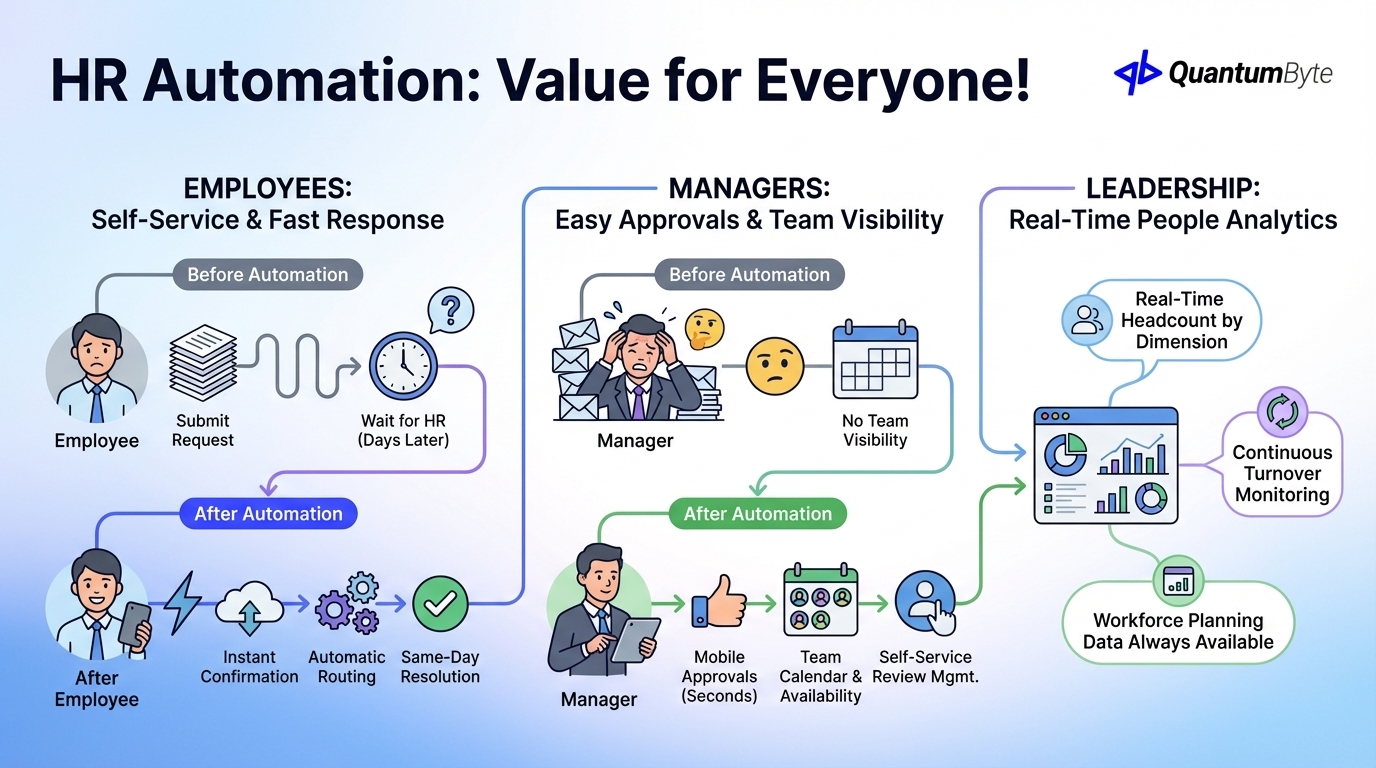
Employees: Self-Service and Fast Response
Before automation: Submit request → Wait for HR → Get answer days later
After automation: Submit request → Instant confirmation → Automatic routing → Same-day resolution
Managers: Easy Approvals and Team Visibility
Before automation: Approval emails pile up, no visibility into team time off
After automation: Mobile approvals in seconds, team calendar with availability, self-service review management
Leadership: Real-Time People Analytics
Real-time headcount by any dimension, continuous turnover monitoring, and workforce planning data always available.
Building Your HR Automation System
QuantumByte develops custom HR apps that streamline your HR workflows:
Custom HRIS or Automation Layer
Build what you need: standalone HR system, automation layer on existing platform, or hybrid approach.
Employee Self-Service Portals
Empower employees with time off requests, information lookup, document access, profile updates, and status tracking.
Manager Dashboards and Approval Workflows
Enable managers with team visibility, quick approvals, performance tracking, and reporting access.
Integration with Existing Systems
Connect your ecosystem: payroll systems (ADP, Paychex), benefits administration, accounting software (QuickBooks, Xero), time tracking, and learning management.
Compliance-Ready with Audit Trails
Built-in protection: complete logging, document retention, access controls, and report generation.
Mobile-Friendly for Distributed Teams
Work from anywhere: responsive design, native mobile experience, offline capability, and push notifications.
Conclusion: Transform HR from Cost Center to Value Driver
HR automation isn't about reducing HR headcount, it's about transforming what HR does:
From: Data entry and paperwork, routine inquiry response, manual process coordination, compliance firefighting
To: Talent strategy and development, culture building and engagement, business partnership, proactive workforce planning
The technology exists. The ROI is clear. The competitive advantage of better employee experience is real.
Next steps:
- Audit your current HR processes
- Calculate your automation opportunity
- Prioritize by pain and impact
- Start with a high-visibility quick win
- Measure, learn, and expand
Ready to transform your HR function? Schedule a consultation to explore your HR automation opportunities.
Other Guides to Explore
- Employee Scheduling Software: Optimize Labor Costs and Reduce Conflicts
- Payroll Automation: Reduce Errors and Save Time on Every Pay Run
- Employee Onboarding Software: Improve Retention and Speed to Productivity
- How to Automate Business Processes to Increase Revenue in 2025
Frequently Asked Questions (FAQ)
How much can HR automation reduce administrative time?
Most implementations achieve 50-70% reduction in administrative time. The primary savings come from self-service (routine inquiries), automated workflows (approvals, data entry), and reporting automation. Your specific savings depend on current process efficiency and scope of automation.
Will HR automation replace HR professionals?
No, it changes their role. Administrative tasks decrease; strategic work increases. Most organizations maintain similar HR staffing while dramatically improving what HR can accomplish.
How do employees feel about HR automation?
When implemented well, employees prefer it. Faster responses, self-service access, consistent processes, and better onboarding improve employee experience. Key success factors: intuitive interfaces, mobile access, and genuine improvement over previous processes.
How long does HR automation implementation take?
Cloud platforms: 4-8 weeks for basic deployment. Custom systems: 6-12 weeks depending on complexity. Full HR transformation: 6-12 months of phased implementation. Start with high-impact areas and expand systematically.
Can HR automation work with our existing payroll/benefits providers?
Usually yes, through integration. Most payroll and benefits platforms offer APIs or file exchange capabilities. Evaluate integration requirements early and factor into your implementation plan.

